Deploy to WPEngine Using Git Push
Prerequisites
- WPEngine account with a site installed
- SSH key — see SSH cheatsheet
1. Add SSH Key to WPEngine
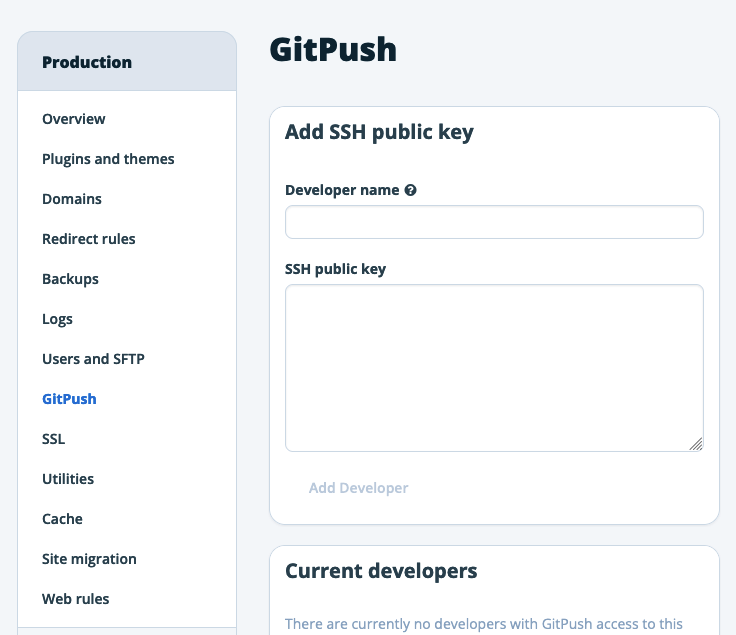
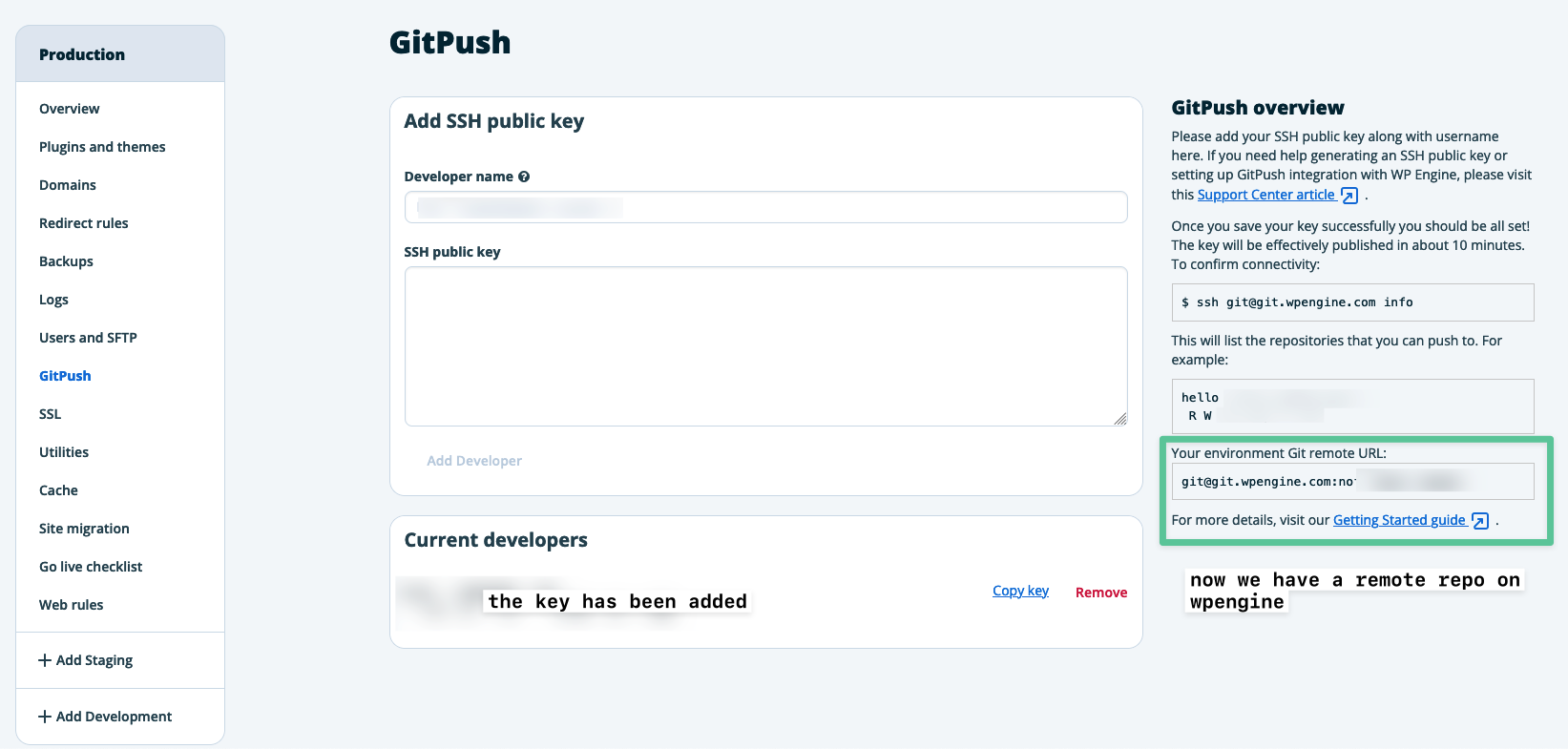
In your WPEngine dashboard, select the environment (production/staging/dev) → GitPush in the side menu → add your public key.
Key publishing takes up to 45 minutes. Connecting before it’s ready will error.
Check which sites your key has access to
1
ssh git@git.wpengine.com info
The key must be added to each environment independently.
2. Get the Remote URL
After adding your key, copy the remote Git URL from the GitPush screen.
3. Init Local Repo
1
2
3
git init
git add .
git commit -m "Initial commit"
4. Add Remotes
1
git remote add staging git@git.wpengine.com:your-remote-repo-url.git
Optional — add a GitHub remote too:
1
git remote add origin git@github.com:yourusername/repo-name.git
5. Add .gitignore
The repo is initialised at the WordPress root so a .gitignore is essential. Typically you deploy theme files only and exclude everything else.
WPEngine recommended .gitignore
1
2
3
4
5
6
7
8
9
10
11
12
13
14
15
16
17
18
19
20
21
22
23
24
25
26
27
28
29
30
31
32
33
34
35
36
37
38
39
40
41
42
43
44
45
46
47
48
49
50
51
52
53
54
55
56
57
58
59
60
61
62
63
64
65
66
67
68
69
*~
.DS_Store
.svn
.cvs
*.bak
*.swp
Thumbs.db

# wordpress specific
wp-config.php
wp-content/uploads/
wp-content/blogs.dir/
wp-content/upgrade/*
wp-content/upgrade-temp-backup/*
wp-content/backup-db/*
wp-content/advanced-cache.php
wp-content/wp-cache-config.php
wp-content/cache/*
wp-content/cache/supercache/*

# wpengine specific
.smushit-status
.gitattributes
_wpeprivate*
wp-content/object-cache.php
wp-content/mu-plugins/mu-plugin.php
wp-content/mu-plugins/slt-force-strong-passwords.php
wp-content/mu-plugins/stop-long-comments.php
wp-content/mu-plugins/force-strong-passwords*
wp-content/mu-plugins/wpengine-common*
wp-content/mysql.sql
wp-content/mu-plugins/wpengine-security-auditor.php
wp-content/mu-plugins/wpe-wp-sign-on-plugin*

# wp core
/db-config.php
/index.php
/license.txt
/readme.html
/wp-activate.php
/wp-blog-header.php
/wp-comments-post.php
/wp-config-sample.php
/wp-cron.php
/wp-login.php
/wp-settings.php
/wp-signup.php
/xmlrpc.php
/wp-admin
/wp-includes
/wp-content/index.php
/wp-content/themes/twenty*
/wp-content/themes/index.php
/wp-content/plugins/*

# large/disallowed file types
*.mp3
*.ogg
*.m4a
*.mp4
*.mpeg
*.mov
*.webm
*.flv
*.avi
*.exe
*.dll
*.dmg
*.iso
6. Push
1
git push staging master
Git push to WPEngine also clears the server cache automatically.
Troubleshooting
Gitignore changes not taking effect — clear the git cache:
1
2
3
4
git rm -r --cached .
git add .
git commit -m "clear git cache"
git push staging master
Large files — WPEngine will reject files over the size limit. Use a CDN for media.
More Info
This post is licensed under CC BY 4.0 by the author.